
Domain Risk
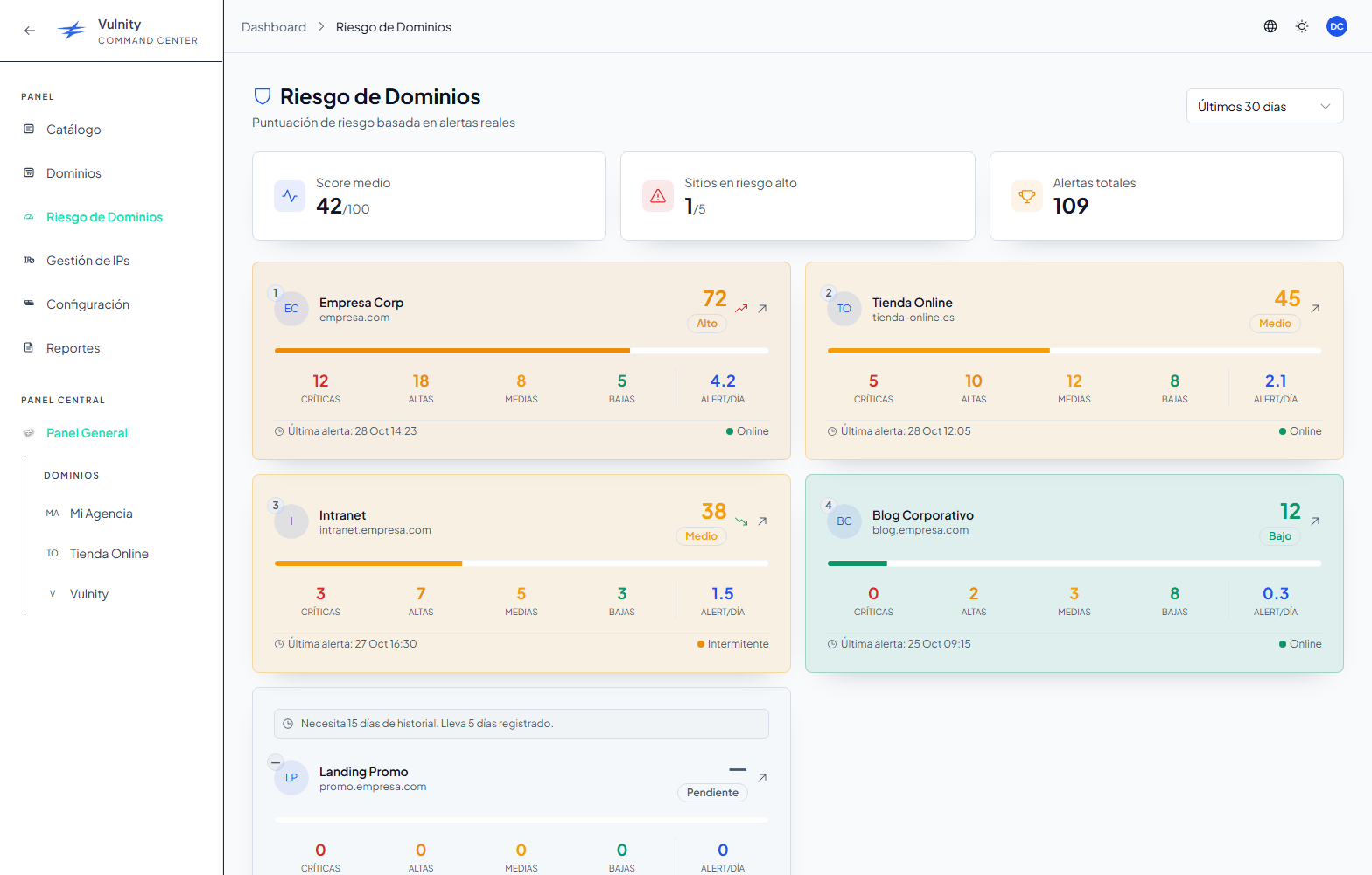
The Domain Risk view gives every active domain a risk score from 0 to 100 based on its recent security-alert activity, so you can see at a glance which sites need attention first.
Risk levels
Section titled “Risk levels”| Score | Level |
|---|---|
| 0–24 | Low |
| 25–49 | Medium |
| 50–74 | High |
| 75–100 | Critical |
Summary cards
Section titled “Summary cards”At the top you see three metrics for the selected time window:
- Average score — the average risk across all your active domains (out of 100).
- High risk sites — how many domains score 50 or higher.
- Total alerts — total alerts across your domains in the window.
A selector lets you analyze the last 7, 14, 30, or 90 days.
Per-domain cards
Section titled “Per-domain cards”Domains are listed ranked by score, highest first. Each card shows:
- The site name and domain, with its rank.
- The risk score and its level, plus a trend arrow (up or down) versus the previous period.
- A breakdown of alerts by severity — Critical, High, Medium, Low — and the alerts per day.
- The time of the last alert and the current heartbeat status (online, intermittent, or offline).
Click a card to open that site’s individual SIEM.
How the score is calculated
Section titled “How the score is calculated”The score is driven by the weighted volume of alerts per day over the selected window:
- Each alert is weighted by severity; critical alerts weigh far more than low ones.
- The score increases when the site’s heartbeat is offline or intermittent, and when there has been a very recent alert.
- A site needs at least 15 days of history before it gets a score; until then it shows as Pending.
The exact scale and modifiers are available in the panel through the information (ⓘ) icon next to the title.
Next steps
Section titled “Next steps”- Individual SIEM — investigate the alerts behind a site’s score.
- Domain Management — check the connection state of each site.
- Alert catalog — what each alert type means and how to respond.