
Storage
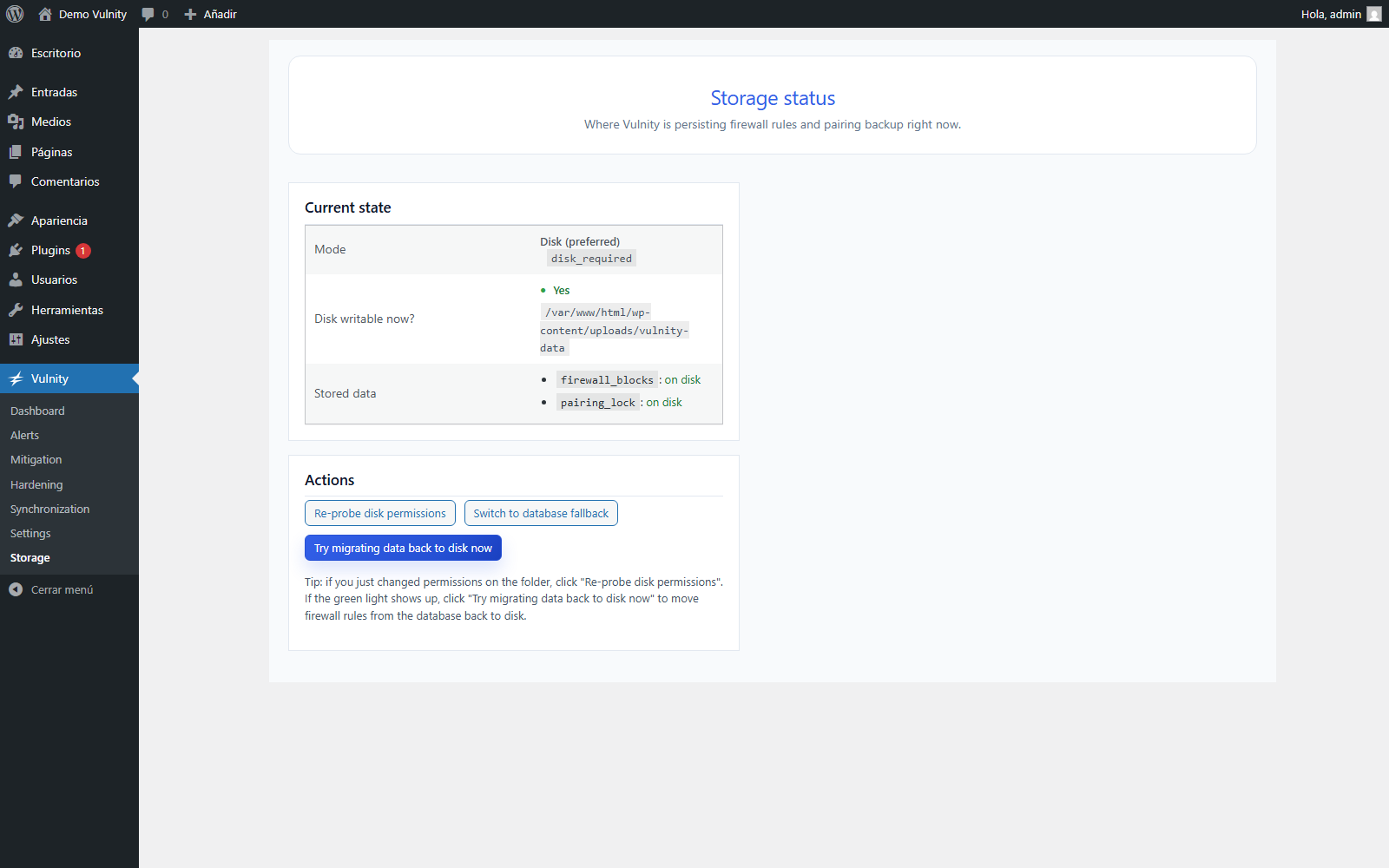
The Storage screen (Vulnity → Storage in wp-admin) shows where Vulnity Security is persisting firewall rules and the pairing backup right now, and lets you check permissions or switch between disk and database storage.
What is stored here
Section titled “What is stored here”Two pieces of state live outside the WordPress options table by default:
firewall_blocks— the firewall’s list of blocked IP addresses.pairing_lock— a backup of the pairing information for this site.
When the disk is writable, they are stored in wp-content/uploads/vulnity-data/, a folder the plugin protects against direct web access. If PHP cannot write there, the plugin stores the same data in the WordPress database instead, so the firewall never loses its blocking state.
Storage modes
Section titled “Storage modes”| Mode | Internal value | Behavior |
|---|---|---|
| Disk (preferred) | disk_required | Chosen during pairing. Data is written to disk; if permissions regress, new writes fall back to the database and a warning is raised until the data is migrated back. |
| Database (fallback) | db_forced | You explicitly chose the database. Disk is not used for this data and no fallback warning is shown, because it is a deliberate choice. |
| Auto (legacy) | auto | Pre-setup or older installs. Disk is tried first; on failure, data goes to the database silently. |
Switching modes migrates the stored data to the new backend so there is a single source of truth.
Current state
Section titled “Current state”The Current state table shows:
- Mode — the active storage mode from the table above.
- Disk writable now? — the result of the latest write probe. When it shows “No — using DB fallback for new writes”, the folder path is displayed so you can check its permissions.
- Stored data — for each key, whether it currently lives on disk, in database (fallback), or is not stored yet.
- Last successful disk recovery — shown once data parked in the database has been migrated back to disk.
Actions
Section titled “Actions”- Re-probe disk permissions — discards the cached probe result (the check is cached for a few minutes) and tests the folder again immediately. Use it right after fixing permissions.
- Switch to disk mode — sets
disk_required. The plugin refuses the switch if the disk is not writable at that moment. - Switch to database fallback — sets
db_forced. This is a supported permanent mode, useful on hostings where the uploads folder cannot be made writable. - Try migrating data back to disk now — moves any data parked in the database back to disk, if permissions allow it.
Automatic recovery
Section titled “Automatic recovery”In disk mode you usually do not need to intervene: the plugin retries the folder check and the migration automatically — with each heartbeat and with a daily recovery task. While data remains parked in the database, the site reports the storage_db_fallback warning to the panel; the badge clears on its own once the data is back on disk.
For the step-by-step permission fixes, see The firewall is using the database as a fallback.
Next steps
Section titled “Next steps”- The firewall is using the database as a fallback — fix permissions on
uploads/vulnity-data. - Cannot create the secure folder — resolve issues with the secure runtime folder.
- The folder exists, but files cannot be written inside — repair write permissions inside that folder.
- Mitigation overview — see the firewall state this storage protects.