
Plugin Synchronization
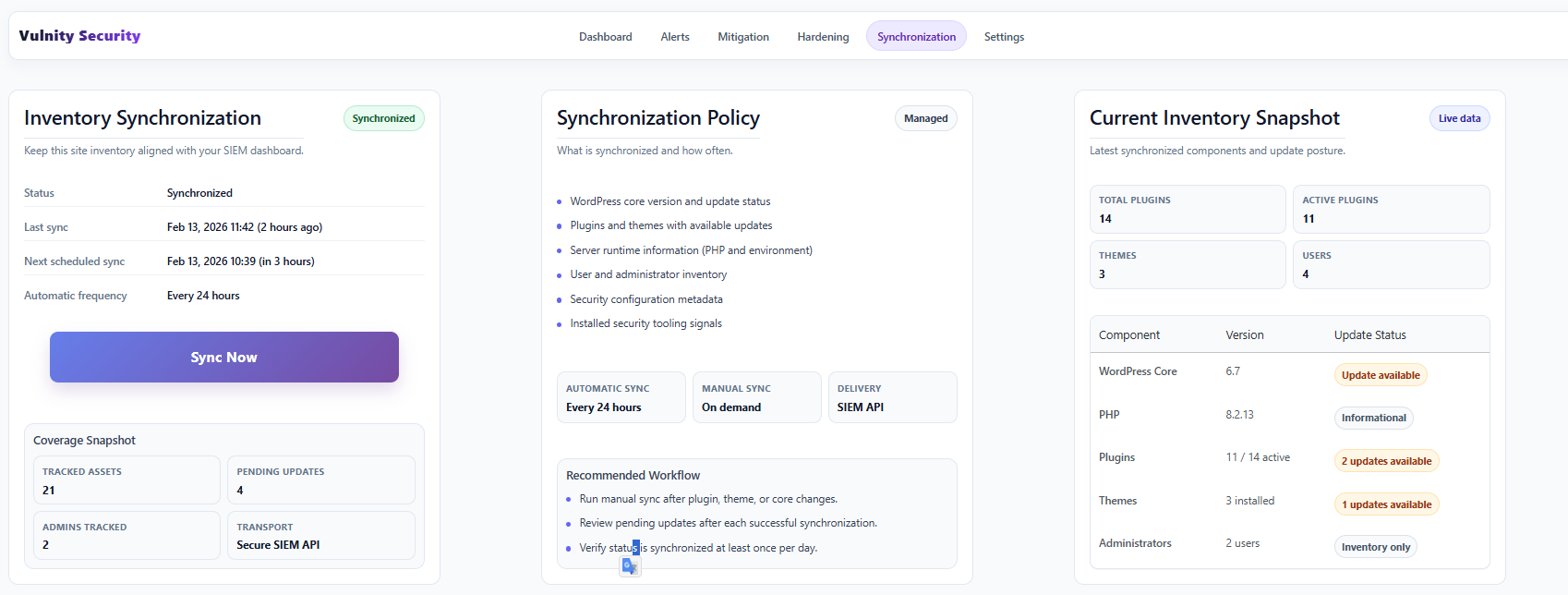
The Synchronization tab shows the state of the inventory your site sends to the SIEM. During synchronization, Vulnity collects and sends:
- All installed plugins, including which ones are active and which have pending updates.
- All installed themes and whether any need updates.
- The WordPress and PHP versions you are using.
- How many users your site has and how many are administrators.
When synchronization runs
Section titled “When synchronization runs”The inventory is synchronized automatically after plugin, theme, or core changes and reconciled daily with the SIEM. The panel at the top shows the status of the last synchronization, when it ran, and when the next scheduled one will run, together with a coverage snapshot of tracked assets and pending updates.
Automatic updates
Section titled “Automatic updates”This section shows whether SIEM-managed automatic updates for plugins and themes are active on this site. The switches here are read-only: automatic updates are enabled or disabled from the panel, in the System section of the site.
Current inventory snapshot
Section titled “Current inventory snapshot”The inventory table lists the latest synchronized components and their update posture:
- WordPress Core — installed version and whether an update is available.
- PHP — the version in use (informational).
- Plugins — active/total count and how many updates are available.
- Themes — installed count and pending updates.
- Administrators — how many administrator users exist (inventory only).
Next steps
Section titled “Next steps”- Plugin settings — check the last and next sync times and test the connection.
- Plugin dashboard — see the overall system status.
- Current limitations — what the inventory is and is not used for.